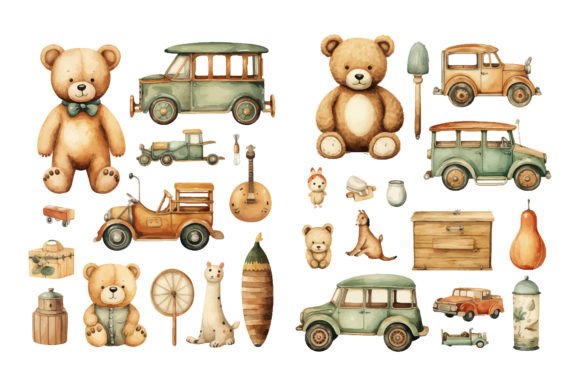
Nostalgic Toys 70s, 80s, 90s Sublimation: A Guide to High-Quality Vintage Design
Welcome to a world where childhood memories meet modern creativity. The Nostalgic Toys 70s, 80s, 90s Sublimation collection is more than just a set of digital images; it is a curated bridge to the past, designed for creators who value authenticity and emotional connection in their work. This beautiful clip art collection features high-quality, hand-painted watercolor images of different vintage toys that instantly remind you of your childhood. Whether you are designing nursery decor, creating unique party invitations, or launching a line of custom apparel, understanding how to leverage these assets correctly can make the difference between a generic product and a standout bestseller.
Understanding the Value of Authentic Watercolor Assets
Many beginners make the mistake of assuming all clip art is created equal. They often download low-resolution JPEGs or vector files that lack the organic texture of true watercolor painting. When working with vintage toys and retro illustrations, the texture is half the appeal. The soft edges, color bleeds, and paper-like grain of watercolor evoke a sense of warmth and nostalgia that flat digital graphics simply cannot replicate.
This specific collection addresses that need by providing 75 PNG files with transparent backgrounds at a substantial 4000px x 4000px size and 300 DPI high-quality resolution. This technical specification is crucial. A common oversight among new designers is ignoring DPI (dots per inch). If you attempt to print a 72 DPI image on a T-shirt or a greeting card, the result will be pixelated and unprofessional. By starting with 300 DPI assets, you ensure that your final sublimation prints remain crisp, vibrant, and sharp, regardless of the substrate.
Common Mistakes in Sublimation Design and How to Avoid Them
Sublimation printing is a fantastic medium for transferring designs onto polyester-coated items, mugs, and fabrics. However, it is unforgiving of poor source files. Here are some frequent pitfalls creators encounter when using nostalgic design elements, along with practical solutions.
Ignoring Background Transparency
One of the most frustrating errors occurs when a designer uses an image with a white background instead of a transparent one. In sublimation, white ink is rarely used; the white of the substrate shows through. If your clip art has a hardcoded white box around it, that box will print as a visible square on your colored mug or dark fabric. The Nostalgic Toys 70s, 80s, 90s Sublimation pack solves this by providing PNGs with transparent backgrounds. Always verify transparency before placing an image into your design software. This saves hours of manual editing and ensures a seamless blend with your background colors.
Misjudging Scale and Composition
Another common issue is improper scaling. Because these files are large (4000px), it is tempting to shrink them down without considering the visual balance. Vintage toys like teddy bears, wooden blocks, and dolls have specific proportions that contribute to their charm. Stretching or distorting these images to fit a awkward space ruins the aesthetic. Instead, maintain the aspect ratio. Use the high resolution to your advantage by cropping creatively rather than stretching. For example, if you are making a baby shower invitation, focus on a single, well-composed toy rather than cluttering the design with too many small elements.
Overlooking Color Profiles
Watercolor illustrations rely on subtle gradients. When preparing files for sublimation, ensure your design software is set to the correct color profile, typically sRGB for digital design which then gets converted during the printing process. Ignoring this can lead to colors that look muddy or dull compared to the vibrant preview on your screen. The hand-painted nature of these assets means the colors are already balanced for visual appeal, but your printer settings must match that quality.
Maximizing Versatility Across Projects
This collection is not limited to T-shirts. The versatility of high-resolution watercolor clip art allows for a wide range of applications. Many entrepreneurs limit themselves to one niche, missing out on broader market opportunities. Consider how these vintage graphics can enhance various products:
- Nursery Decor: The soft tones of watercolor are perfect for baby rooms. Use images of wooden toys and classic dolls to create calming, gender-neutral wall art.
- Stationery and Paper Goods: From greeting cards to party tags, the nostalgic theme resonates with adults buying gifts for children or reminiscing about their own youth. The 300 DPI resolution ensures that text printed over or near the images remains legible and sharp.
- Digital Scrapbooking: For digital planners and scrapbooks, these PNGs add a tactile feel. Layer them with paper textures to mimic a real physical album.
- Logo Design: Small businesses focusing on handmade goods or vintage resale can use these icons as part of their branding. A simple teddy bear or block set can serve as a memorable logo element when paired with elegant typography.
What to Check Before You Buy or Use
Before integrating any asset pack into your workflow, evaluate its compatibility with your needs. First, check the file formats. This package includes both PNG and EPS files. While PNGs are ready-to-use for most sublimation and digital projects, EPS files are vector-based. If you need to scale an image infinitely without any loss of quality for large-format posters, the EPS format is invaluable. However, note that watercolor textures are raster-based by nature. The EPS inclusion is a bonus for layout flexibility, but the primary value lies in the high-res PNGs.
Second, consider the theme consistency. A cohesive design requires elements that look like they belong together. Mixing disparate clip art styles—such as combining flat vector icons with detailed watercolor paintings—often results in a disjointed final product. This collection maintains a consistent hand-painted style across all 75 images, ensuring that whether you choose a retro car, a doll, or building blocks, they visually harmonize.
Finally, think about your audience. The appeal of childhood nostalgia is powerful. Adults aged 20–50 are currently driving much of the consumer market for retro-themed goods. They are looking for authenticity, not just novelty. Using high-quality, professionally rendered images signals to your customers that you care about quality. It builds trust and encourages repeat business.
Practical Tips for Better Results
To get the most out of your Nostalgic Toys 70s, 80s, 90s Sublimation files, start by organizing your assets. Create folders for different categories such as "Dolls," "Vehicles," and "Blocks." This saves time during the design phase. When composing your designs, leave adequate negative space. Watercolor art breathes better when it is not crowded. Let the white space (or background color) frame the toy, drawing the eye directly to the detailed brushwork.
Also, experiment with layering. Since the backgrounds are transparent, you can place a toy image over a textured paper background or a soft gradient to add depth. This technique works exceptionally well for blog headers and social media graphics, where standing out in a feed is essential.
Thank you for visiting my shop and taking the time to understand how to best utilize these creative resources. By avoiding common technical mistakes and embracing the artistic potential of watercolor vintage toys, you can create products that are not only visually appealing but also emotionally resonant. Whether you are a seasoned professional or a hobbyist just starting out, these tools are designed to support your journey in creating meaningful, nostalgic designs.